@TrafficAlertBOT: Difference between revisions
Jump to navigation
Jump to search
No edit summary |
(→Report) |
||
| Line 7: | Line 7: | ||
* Send command /setup on the group the BOT will guide you to set-up the notification system on that group. | * Send command /setup on the group the BOT will guide you to set-up the notification system on that group. | ||
===Report=== | ===Report=== | ||
[[ | [[File:TrafficAlerts.png|200px|thumb|right|Telegram [https://t.me/trafficalertbot @TrafficAlertBOT]]]<br> | ||
The bot will post national traffic notifications to the group. | The bot will post national traffic notifications to the group. | ||
===Commands=== | ===Commands=== | ||
==== /help ==== | ==== /help ==== | ||
Revision as of 09:05, 20 September 2020
Telegram
National Traffic notifications poster issue
- Find the bot @TrafficAlertBOT (Goto Contacts and search for it)
- Tap to open (Click on START if required to initialize comms with BOT)
- Place the BOT on a Telegram group you need the notifications to be sent on.
- Send command /setup on the group the BOT will guide you to set-up the notification system on that group.
Report

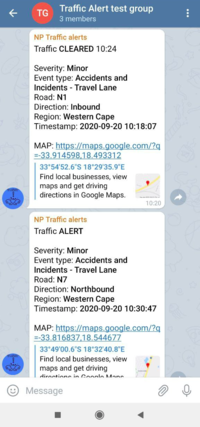
Telegram @TrafficAlertBOT
The bot will post national traffic notifications to the group.
Commands
/help
Bot will display commands available through the bot for advanced help related to a command send /help command
/ping
This is a communication test command the bot will reply with a pong if it recieves this command.
/setup
The bot will guide you to set-up traffic notifications on a group.
/delete
Shows a list of notification rules for the group the bot are on, a user can delete each rule induvidually through this command.